If you haven't heard already, there's a new sheriff in town. The CCI are set to police EVERYONE on the internet for "copyright infringement". CCI have partnered with all the major ISP's are being put in position to essentially enable logging of P2P and BT traffic. The plan? Watch it, document it, and start identifying offenders. Throttle that traffic, eventually cut it off, and fine them.
Yup, and you thought "the blackout" had made a difference. LOL. Epic.fail.
So you, like a million other people, seeing this news...are wondering, "Well WTF do I do now?"
You're now aware that the BitTorrent downloads and uploads are totally visible. And now, there's someone there watching, logging, and putting a bureaucracy around it. This probably isn't going to end well for you, if you continue.
CCI and it's methods (straight out of the MPAA/RIAA handbook), are, put simply, RETARDED.
So, how then should we beat the Center for Copyright Information?
How about a cyberlocker, or basically cloud storage. Yup, that's an easy way to beat CCI. All of that HTTPS will do the trick. Of course, this isn't really BT friendly.
How about a "BT anonymizer". Yup, that's an easy way to beat CCI. But that's limited to BT only.
Those are both good options. One is obviously a change in the pattern, totally different. The other is tailored specifically to the BT task at-hand. Both will prevent BitTorrent snooping. Both will easily defeat CCI.
A better option, is to find a hybrid. Find something that will cover the most, and take care of the task at hand.
Beat CCI with VPN.
Connecting to a VPN while using BT, or using the internet in general, will beat CCI and anyone else that attempts to employ the same lame type of policing on internet traffic.
We mentioned earlier the great speeds available on HideMyAss. That's definitely an option right there.
What you're really looking for, out of a VPN service (especially if you intend to pay) is quality and security. Go for L2TP and OpenVPN where possible. Steer clear of PPTP only. Providers with servers in the NL and in Sweden are good. Logging will be less of a worry. If you just use US or UK VPN, you're asking for trouble with BT/P2P useage.
For good VPN software and high speeds check out HideMyAss.
For the best deal on Usenet + VPN, go with Giganews + VyprVPN.
For a VPN focused on no logging and providing a lot of SE servers, go with VPNTunnel.SE.
For a provider using multihop VPN for added security, try iVPN.net.
For a new up and coming provider with a lot of servers and cheap prices see IPVanish.
For a little south-of-the-border flavor with your VPN, CactusVPN is cheap and easy.
For anyone who knows what "shell" means, you should check out Shells.net.
Ok so if that's not enough options for beating CCI, check back later. I'm sure we will have thought of something else. Probably while we were on the can.
Showing posts with label vpn. Show all posts
Tuesday, April 3, 2012
Tuesday, July 12, 2011
HideMyAss VPN Review - 95% of Network Fast Enough for Streaming High Def!
httpI came across a really well done VPN review on HideMyAss. The folks over at VPNandUsenetReviews.com did an amazing job on an indepth review of the HMA VPN software and service, including a full test.
They did such a good job they documented just about everything in the software, and then went off and did a full speed test. But they didn't stop there, they actually did some math on the results and produced some real conclusions! Amazing...
The basic conclusion is that HMA has a really fast network. Over 95% of it can support speeds suitable for streaming high def. Even if you accept some of the highest measures of speeds required, over 70% of the HMA VPN network still meets the requirements. Pretty cool when you consider it's only $11.52/mo.
The indepth review includes screenshots of almost all the HMA features in their VPN client software. It also includes all the speed test results from the 20 something countries that HMA offers.
Have a look at all the screenshots of the software and the full test here.
Personally I like both VyprVPN and HMA for VPN service and VPN clients. I think either one is an excellent choice. They both end up highly ranked over at that site too for obvious reasons (price, features, performance, etc.)
They did such a good job they documented just about everything in the software, and then went off and did a full speed test. But they didn't stop there, they actually did some math on the results and produced some real conclusions! Amazing...
The basic conclusion is that HMA has a really fast network. Over 95% of it can support speeds suitable for streaming high def. Even if you accept some of the highest measures of speeds required, over 70% of the HMA VPN network still meets the requirements. Pretty cool when you consider it's only $11.52/mo.
The indepth review includes screenshots of almost all the HMA features in their VPN client software. It also includes all the speed test results from the 20 something countries that HMA offers.
Have a look at all the screenshots of the software and the full test here.
Personally I like both VyprVPN and HMA for VPN service and VPN clients. I think either one is an excellent choice. They both end up highly ranked over at that site too for obvious reasons (price, features, performance, etc.)
Monday, December 20, 2010
Question: Are you using either Usenet or VPN Services?
Do you use either Usenet or VPN services currently?
Hey Readers,
I'm curious - are you using either a Usenet newsgroup provider, or a VPN service provider? If so, which provider are you using for the service?
Giganews, VyprVPN, StrongVPN, Easynews, NewsDemon, TuVPN - another service provider?...
Doesn't really matter if it's a pay or free provider, of either service.
I'm trying to figure out what is actually in use out there. I can look it up all I want, but I figure asking you readers is just as effective.
Please let me know in the comments! Yes/No (to either service), and who is the provider...THANKS!
**bonus - if you're willing to comment on how the service is, in your opinion, that would be AWESOME!**
Hey Readers,
I'm curious - are you using either a Usenet newsgroup provider, or a VPN service provider? If so, which provider are you using for the service?
Giganews, VyprVPN, StrongVPN, Easynews, NewsDemon, TuVPN - another service provider?...
![]() |
| Thou shalt secure thine connection before traveling |
![]() |
| All pimps wear this hat |
![]() |
| Is this how you get security on the net? |
**bonus - if you're willing to comment on how the service is, in your opinion, that would be AWESOME!**
Monday, November 8, 2010
How to Beat Firesheep - Secure Open Wifi (Part 3)
This is Part 3 of the Firesheep series, How to Beat Firesheep. Part 1 introduced the tool and the attack, Part 2 talked about the seriousness of the vulnerability.
Part 3 will tell you how to beat Firesheep.
First, let's setup up some basic ground rules:
Let's get started.
What are the other pundits saying? Most of them are going with VPN as the best solution, including the Firesheep developer himself. Hey, if Harvard recommends VPN, there must be something to it, right?
I would honestly reccomend people look into a secure service like VyprVPN. Cost is minimal and benefits are great. Especially if you are conducting "work" over open Wifi, or if you are spending time on social, financial, or other private sites Consider it your own little private encrypted tunnel on an otherwise open network. I have no problem endorsing VyprVPN as an ideal solution that will keep you on Open Wifi, but keep you safe from kiddies session-hijacking your logins (VPN solves a number of other security concerns as well). As I mentioned in my earlier review, this service also comes free with Giganews, so if you're already on Usenet, now may be the time to look at Giganews.
I figure it's also worth mentioning solutions that are NO GOOD. In other words, these will NOT WORK.
Both of these flavors have one thing in common: encryption. If you don't know, now you know.
BTW, if you are running Firesheep for whatever purpose, be aware that Microshaft is detecting it as a "virus/malware". I lol'd. Another BTW, if you are using the standard Windows antivirus/antimalware you should seriously consider upgrading to an alternative.
Part 3 will tell you how to beat Firesheep.
![]() |
| Let's drop in a lil napalm and cook 'em down! |
- We all know you're going to be on Open Wifi at some point, so telling you "get off open wifi" is retarded
- The problem is essentially owned by the website operators, not the Wifi operators. The issue is HTTP cookies, and the ability to session-hijack, not the ability to login to a Wifi access point at Starmucks.
- Sites that are vulnerable to this attack today may not be vulnerable tomorrow, however, there will always be sites that are vulnerable, therefore it is important to at least try and browse securely while on Open Wifi
Let's get started.
- Secure your browsing on the Open Wifi by using VPN. This is by far the most effective and best way of solving the problem. This will encrypt all of your traffic on the wifi network and defeat anyone trying to use Firesheep against you. It can however cause you to spend a few bucks. Solutions like VyprVPN are perfect for solving the session-hijack problem. See my earlier review on VyprVPN here (figures it would come in handy!) quick note: VyprVPN is included free in Giganews subscriptions.
- Secure your browsing on the Open Wifi by using SSH. This is very similar to using a VPN, except I would consider it much more difficult to setup. Essentially it provides the same benefit, an encrypted connection. Lifehacker did a good tutorial awhile back on setting up a free SSH server using your home computer here. Cygwin and OpenSSH are essentially the solutions here, but beware, setup is perhaps not for the faint of heart. Ducks need not apply.
- Utilize SSL versions of websites (HTTPS rather than HTTP). This is easy. Many websites have HTTPS versions, even Facebook. However there is a major drawback: often times while browsing you will inadvertently switch back to HTTP. Try that Facebook link, then click around - see the problem? You're switching from HTTPS to HTTP in a heartbeat. This solution is easy, but perhaps less than ideal, and not very effective.
- Install Firefox addons that will automatically direct you to HTTPS website versions. Two options are: HTTPS Everywhere and Force-TLS. This is also easy, and it will solve the problem of having to remember to type "HTTPS", or change your bookmarks. The addon will automatically direct you to the secure version of the site. Of course this still suffers from the same problem as #3, websites will easily switch you from HTTPS to HTTP, and is therefore still problematic.
- Use the "Blacksheep" addon. Blacksheep is a firefox addon that will supposedly scan the Open Wifi you are on and determine if anyone is running Firesheep on it. So, if it you see a return, then at least you are aware of what's going on, and can hopefully take the necessary precautions. Still this does not solve the problem, it only makes you aware of the potential danger. Blacksheep does tell you the IP address of the attacker though. But if you're sitting in Starmucks, this may mean all you can do is yell out "Hey 192.168.0.XXX, you SMOKE POLE!" There is another drawback to this too - you don't need Firesheep to conduct this type of attack (Wireshark + WinPCap = Win). So although Blacksheep may detect Firesheep, it does not solve the session-hijack problem. The other issue here is this software is newly released, which could mean a back-and-forth between the "sheep". (fix, counter, fix, counter)
- Use a Mifi/Cellular Modem/Hotpsot type device. I think every major cellular provider in North America sells these things. Some of them are just USB sticks you plug into the computer. In other cases, you can tether your phone to the laptop. The problem here is this costs money, a lot of money, and is tantamount to saying "don't use Open Wifi". Not an ideal solution, although it is effective at solving the problem.
- Use Fireshepherd. This is a brand new piece of software designed specifically to combat Firesheep. It is not an addon like Blacksheep. Fireshepherd periodically sends out a stream of garbage that is intended to screwup or crash Firesheep. YMMV with this software. So far I have not read any reviews or done extensive tests myself. As I said, it's brand new. The other potential drawback is that this, like Blacksheep, does not apply to the actual root problem of session-hijacking. In other words, this may be another solution to the Firesheep issue, but not a solution to the session-hijacking problem. This is also vulernable to the same tit-for-tat as Blacksheep.
- On a Mac? Try Meerkat. This is basically setting up SSH for your Mac, but Meerkat makes it a little easier. Of course, Meerkat costs money. There is a very good guide that deals with the entire Meerkat setup process here. Remember, OpenSSH is installed in Mac OS X by default. However, you still are going to deal with setup though, and again, that depends on whether you're a duck or not...
| Warning from Blacksheep that Firesheep is active on your network |
![]() |
| I heard these people were smart |
I figure it's also worth mentioning solutions that are NO GOOD. In other words, these will NOT WORK.
- Using Tor. Tor will not solve your problems. In fact, if the owner of the exit node is running Firesheep, you just got pwned, hard. Even the Firesheep developer thinks using Tor is a bad idea.
- Enable WPA2 and tell yourself "it's all good now". Sure, you've done good, but you can still get pwned, pretty hard. ARP poisioning and DNS spoofing take a little bit more tech savvy, but software exists to conduct those attacks as well - on either a wirless WPA2 network, or a wired network. Google: Cain and Abel.
- Using a VPN or SSH tunnel you don't know and trust. This is bad, mmkay? You just pushed the problem off to that exit connection. Since you don't know anything about it, and clearly can't trust it...you're basically asking for trouble. "Use VPN" is good, but just blindly using whatever VPN is not - get it?
- Encrypt all of your communications on the wireless network (VPN, SSH, Meerkat, etc)
- Encrypt the communications with the particular website (HTTPS, Addons, etc.)
Both of these flavors have one thing in common: encryption. If you don't know, now you know.
BTW, if you are running Firesheep for whatever purpose, be aware that Microshaft is detecting it as a "virus/malware". I lol'd. Another BTW, if you are using the standard Windows antivirus/antimalware you should seriously consider upgrading to an alternative.
![]() |
| Getting pwned by script kiddies is bad, mmmkay? |
Saturday, November 6, 2010
Attack Clients on Open Wifi - Firesheep (Part 2)
Looks like the 15 minutes of fame for Firesheep is getting extended...
Sites you can pwn using Firesheep:
In truth, Wireshark did this ages ago via the little-known-method of copy/paste :) Turn the clock back to the beginnings of 802.11, war-driving, wep-cracking, and this type of attack was still valid. Why all the discussion now? Because instead of copy/paste, you get a nice little GUI and employ the uber-powerful double-click!
What does all this mean? Whenever an attack gets easier, it tends to become more popular. You can bet top dollar that going forward, at Starbucks, Safeways, Hotels, or wherever there is free open wifi, there will be someone running Firesheep. Hint: look for the script kiddie, social outcast, or the dude laughing so hard he looks like he may shit himself.
Few words of caution if you intend on "testing" this out in your neighborhood:
Sites you can pwn using Firesheep:
- Flickr
- Yahoo! Mail
- Windows Live
- Hotmail
- Google.com (not GMail)
- Slashdot
- Amazon
- Newegg
- Home Depot
- United Airlines
- Office Max
- Wordpress (when not using their optional SSL)
- More coming soon!
In truth, Wireshark did this ages ago via the little-known-method of copy/paste :) Turn the clock back to the beginnings of 802.11, war-driving, wep-cracking, and this type of attack was still valid. Why all the discussion now? Because instead of copy/paste, you get a nice little GUI and employ the uber-powerful double-click!
What does all this mean? Whenever an attack gets easier, it tends to become more popular. You can bet top dollar that going forward, at Starbucks, Safeways, Hotels, or wherever there is free open wifi, there will be someone running Firesheep. Hint: look for the script kiddie, social outcast, or the dude laughing so hard he looks like he may shit himself.
Few words of caution if you intend on "testing" this out in your neighborhood:
- People are already doing this, so you're behind the times (see above link)
- Most owners of open-wifi at commercial establishments have ToS (terms of service), you are likely violating those terms of service. However, those ToS also go both ways, informing users that there can be no expectation of privacy, or liability for the store/wifi owner, should damage occur.
- In many countries/states/counties/cities, it is illegal to sniff networks for user information unless said users authorize the action. Check your local laws. IANAL
- POP3 Mail
- SMTP Mail
- IMAP Mail
- FTP
Attack Clients on Open Wifi - Firesheep
Keeping the theme of security rolling, I wanted to put a quick post about Firesheep.
This is a relatively new tool, but its based on a fairly old attack method (sidetracking/session-hijacking).
Why do we care about this? Because it's a legit attack over open WiFi that will allow a user to essentially hack your logins/passwords and gain access to your "private accounts" (i.e. Facebook, Email, etc.)
Slashdot and many other publications have already picked up on Firesheep, and the developer has already felt the full effects of what is known as the "security shitstorm." The security shitstorm normally ensues when an old attack (or a new attack) becomes "easy" in the wild. People moan and groan and bitch at the developer, mostly. How could you do this, they say. Why are you such an ass, other developers moan. You're just enabling the script kiddies, all the old dudes yell. Yeah, yeah, whatever. Software is software, get over it.
Onto the heart of the subject, Firesheep.
Firesheep was released on Monday, November 1st, and has already been downloaded something like 500,000 times. Firesheep is an addon to Firefox. The addon allows you to "sniff" the open wireless network you are on (at starbucks, safeway, the airport, whatever). Firesheep sniffs for, put simply, logon cookies. Other users on the same open Wifi as you, that login to say, Facebook...well you steal that "logon cookie" (I'm simplifying, run with me here...). You then use that logon cookie and gain access to whatever private site that user was logged into (i.e. Facebook). Pretty cool eh?
Think of it this way, when you login to Facebook, and then close that tab/window/whatever...but decide 20 minutes later to go back...you don't always have to retype your user/password...do you? No, you don't. That information and the session authentication is stored in a little piece of shit called a cookie. Well if someone can copy that cookie, they can fake Facebook into thinking they are you. Viola - they are now in your account.
There are limitations, of course, and I think the developer does an excellent job of explaining them on his website. The problem essentially arises from only securing the login page and information. I won't get into the details, because they don't really matter to most of the public. You just need to know that your shit is vulnerable. Maybe if I get bored I'll put a list of major websites that are vulnerable, maybe not...By the way, screw you if you don't like the dude or the tool...as I said, software is software.
You may recall me mentioning how that wonderful open wifi at the airport was not-so-good after all in an earlier post about VyprVPN. Well, here's your proof. Seriously folks, be careful. I didn't mention the longer methods, that of course, are still valid...but now that Firesheep is out in the wild, it's gotten a lot easier. I'll be posting again with some screenshots of Firesheep in action around town. I'll also incorporate a how-to-beat Firesheep in the very near future. Hint: VPN
This isn't just Facebook or Flickr we're talking about here, a lot of your logins are potentially vulnerable to this type of attack.
![]() |
| BBQ Sheep |
Why do we care about this? Because it's a legit attack over open WiFi that will allow a user to essentially hack your logins/passwords and gain access to your "private accounts" (i.e. Facebook, Email, etc.)
![]() |
| All your HTTP logins belongs to me |
Onto the heart of the subject, Firesheep.
Firesheep was released on Monday, November 1st, and has already been downloaded something like 500,000 times. Firesheep is an addon to Firefox. The addon allows you to "sniff" the open wireless network you are on (at starbucks, safeway, the airport, whatever). Firesheep sniffs for, put simply, logon cookies. Other users on the same open Wifi as you, that login to say, Facebook...well you steal that "logon cookie" (I'm simplifying, run with me here...). You then use that logon cookie and gain access to whatever private site that user was logged into (i.e. Facebook). Pretty cool eh?
![]() |
| Screenshot of Firesheep - Stealin Facebook Logins |
There are limitations, of course, and I think the developer does an excellent job of explaining them on his website. The problem essentially arises from only securing the login page and information. I won't get into the details, because they don't really matter to most of the public. You just need to know that your shit is vulnerable. Maybe if I get bored I'll put a list of major websites that are vulnerable, maybe not...By the way, screw you if you don't like the dude or the tool...as I said, software is software.
You may recall me mentioning how that wonderful open wifi at the airport was not-so-good after all in an earlier post about VyprVPN. Well, here's your proof. Seriously folks, be careful. I didn't mention the longer methods, that of course, are still valid...but now that Firesheep is out in the wild, it's gotten a lot easier. I'll be posting again with some screenshots of Firesheep in action around town. I'll also incorporate a how-to-beat Firesheep in the very near future. Hint: VPN
This isn't just Facebook or Flickr we're talking about here, a lot of your logins are potentially vulnerable to this type of attack.
Thursday, November 4, 2010
VLC Stream & Convert + VPN = Stream HD Over 3G/4G with Android (Part 3)
Following up on this topic, I have some "Tips & Tricks" for users seeking to stream HD/SD to their Android phone over 3G/4G.
Couple things up front:
47KRYQWK3Q5P
Couple things up front:
- A New version of VLC S&C has been released by the developer. I suggest you download it! You may notice that VPN is now a prominent part of his app! :D :D
- Along with the updated app version, the developer has posted a VPN setup guide here. I suggest you take a look at it. You may notice some similarities! This is a good thing! As I mentioned before in my earlier posts, I believe streaming over VPN to be the best solution for 3G/4G connections.
- For security purposes, make sure you give your VPN username and password some serious consideration. "vpnuser" is fine, or whatever (vpnass, vpnyourmom, these are also good!)...but for the love of god, give it a decent password. Remember what you're doing here people.
- Enable the Wifi radio, but do not connect to a Wifi network when streaming over 3G/4G. I have had problems streaming when Wifi radio is not on. I am unsure as to why this is, but I have also read of other users having the same issue.
- When possible, try to avoid switching from 3G to 4G. I know I know, but if you suddenly decide to turn on 4G in the middle of watching a movie, at say, the National Mall, be prepared for a wait, and possibly the need to reconnect to both the VPN and the remote VLC server.
- Moving around is just fine, as is roaming from cell tower to cell tower, however you may notice some buffering. This is fine, just be patient...
- Enable encryption in the Android VPN settings, as well as checking the box in Windows VPN setup to "require all users to secure their passwords". See the VPN setup info for more on this subject.
- Use H264 for your streaming, and experiment with the bitrate/quality settings. You may find that reducing the quality setting will improve streaming. The developer has a comment on quality settings as well in their VPN setup page
- Check which version of VLC you are running on the computer. I recommend running VLC 1.1.3, or VLC 1.1.2
- Last, but certainly not least, consider buying the VLC S&C Pro version, or donating. Support the developer if you like what's going on. Of course you can fully utilize the features of the free version to get the job done, but thats not the point - give credit where credit is due. Its not that much money anyway. Besides, the guy has airplane tickets to buy, I'm sure ;)
47KRYQWK3Q5P
Friday, October 29, 2010
VLC Stream & Convert + VPN = Stream HD Over 3G/4G with Android (Part 2)
Alright, as promised, here are some screenshots to help with the setup so you can stream HD over 3G/4G to your Android phone.
First, recall my previous post on the subject and the tools required to get the job done
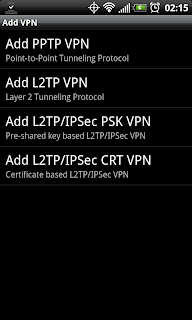
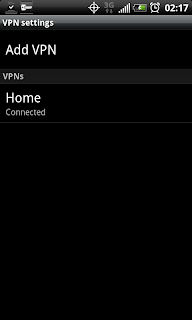
Once you setup the VPN, which for PPTP is as easy as providing the server address (IP address) and credentials (user/pass), you will have a VPN network that you can connect to. Screenshot below shows a "Home" VPN after it has been added to the phone.
When you click the network to connect to the VPN you will need to supply the user/pass. This user/pass is the one you setup on the computer with the incoming VPN connection. Once connected it will tell you so, and place an active key icon in the phone status bar.
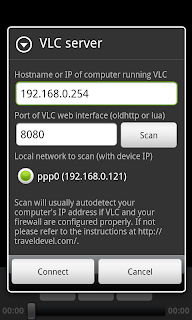
Once the phone is connected to the VPN, go ahead and open VLC S&C on the phone. Make sure you supply the correct server address for your computer with VLC media player running. Also make sure that VLC has the "web interface" active (view > add interface > web interface).
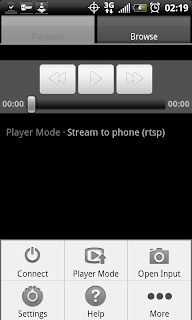
Here is the home screen in VLC S&C with the menu open. You need to supply the computer information under the connect menu.
Once finished go ahead and click connect. If it all is going well you will get a connect prompt, and the VLC logo in the phone status bar will be active. When VLC S&C is disconnected that icon will have a red X through it. Plus you will get an error, "can not connect to bla bla bla."
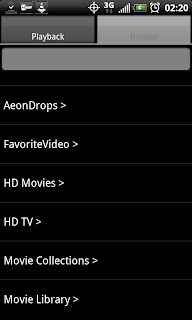
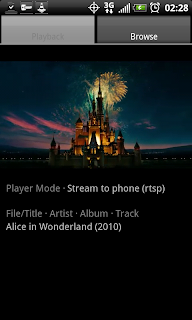
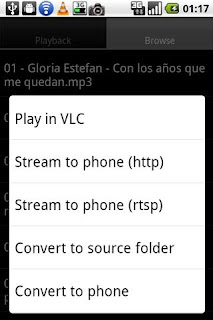
Put your player mode on "Stream to Phone RTSP". Open the Browse tab and select your movie/tv/video files you wish to play (.mkv play very, very well).
Now, for some example screenshots of the quality you can expect to come through on 3G:
Couple of notes on the example screenshots:
So there you have it...streaming HD (or SD) video over 3G/4G to an Android phone. Using nothing but freeware and windows. The solution is simple, first establish the VPN connection, then fire up VLC Stream & Convert on the phone. Navigate to your files, play, and enjoy HD video on your phone while on the go.
Questions/Comments/Rants/Raves, put them in the comment section. Hopefully this post has been useful for somebody!
.
First, recall my previous post on the subject and the tools required to get the job done
- Phone with Android (I suppose this could work on iPhone/iPad as well)
- Computer for VPN Server (allows phone to VPN connect to your LAN)
- Computer for VLC media player (free software, must activate web interface)
- VLC Stream & Convert app from Android Marketplace (free)
![]() | ||
| Types of VPN available on Android for setup |
![]() |
| "Home" VPN Network, click to connect |
Once the phone is connected to the VPN, go ahead and open VLC S&C on the phone. Make sure you supply the correct server address for your computer with VLC media player running. Also make sure that VLC has the "web interface" active (view > add interface > web interface).
Here is the home screen in VLC S&C with the menu open. You need to supply the computer information under the connect menu.
![]() |
| VLC Stream & Convert Menu |
![]() | ||
| VLC Stream & Convert Connect Menu |
Put your player mode on "Stream to Phone RTSP". Open the Browse tab and select your movie/tv/video files you wish to play (.mkv play very, very well).
![]() |
| Browse tab displaying folder tree |
![]() |
| Streaming Alice & Wonderland over 3G in portrait mode |
![]() |
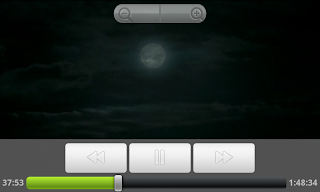
| Streaming Alice & Wonderland over 3G in landscape, showing controls |
![]() |
| Streaming Alice & Wonderland over 3G in landscape, showing subtitles |
![]() |
| Streaming Avatar over 3G in landscape |
- These files being played by VLC are .mkv rips of HD sources, these are 720p rips (technically VLC S&C will play anything VLC will play, so have at it, I used these for illustrative purposes). If you'd like to show screenshots of other types of files say so in the comments and I'll post them. I have SD, 1080p, other 720p, HDTV rips, etc etc.
- It is hard to take screenshots of live video - so if you see a line, as you can sort of see in the last one, that is because of the movement in the video, not the quality of the playback. I tried to use pause, and then screenshot, but pause reduces the video to half size in the app and negates the purpose of trying to take a screenshot...
- VLC S&C is free, but there is also a paid version. The free version is limited in some functionality, but also has some quality limitations for the H.263 and H.264 codecs. I am using the free version with the H.264 and the bitrate on 768. Aspect ratio is on 16:9. For playback, landscape video width is set at 880 (for the EVO4G). For playback, portrait video width is set at 480. I find these settings to work extremely well on most .mkv for the EVO4G. I hope that comes through on the screenshots.
- Playback is free of stutter and audio is in-sync, clear and crisp
So there you have it...streaming HD (or SD) video over 3G/4G to an Android phone. Using nothing but freeware and windows. The solution is simple, first establish the VPN connection, then fire up VLC Stream & Convert on the phone. Navigate to your files, play, and enjoy HD video on your phone while on the go.
Questions/Comments/Rants/Raves, put them in the comment section. Hopefully this post has been useful for somebody!
.
Thursday, October 28, 2010
VLC Stream & Convert + VPN = Stream HD Over 3G/4G with Android (Part 1)
Laides and Germs,
You'll have to excuse me for not updating in the recent past - been very busy. Working two jobs. One for NASA, and another, well for someone else. Plus there's another job in music. Then there's all that glorious free time, which is mainly used for laundry, bills, drinking, and sleeping. Occasionally eating too. I am a skinny bastard though...
OK, I'll get right to the point - I am a huge fan of VLC Stream & Convert app for Android. It's fucking smoking.
This post is all about using that app to stream HD video to your phone over 3G/4G.
Technically, VLC S&C does this "out of the box". However, you'll find forums, posts, and comments all over talking about problems and issues with RTSP (real time streaming protocol) and just problems in general. You will also run into issues with your carrier - note the setup instructions in that link, for each carrier it can be different, or blocked completely...Hell, even I couldn't get the bitch to work properly over 3G/4G (Sprint). I could connect to the computer running VLC via 3G/4G, but I couldn't play shit. Of course, this doesn't make the app useless, you can totally connect via your local wifi and go about your business. See my earlier post on that bad ass business.
But, if you want 3G/4G HD streaming, I believe I have found the best way to do it - with VPN. It is working for me. In fact, while I'm writing this, I'm streaming Star Wars IV, A New Hope, in 720p (.mkv file) to the EVO4G over 3G with NO STUTTER. Audio is crisp, video is perfect quality. Like I was watching it on my plasma tv.
The solution is so simple, I love it: You first connect the phone to the VPN server on your network, then fire up VLC S&C. Then connect VLC S&C as usual, and viola you are finished.
I'll try to clean this post up a bit in the next few days with more instructions and hopefully some screenshots. For now, this rough bullet list will have to suffice:
Don't forget, if you're behind a router/firewall to get your port forwarding on. For both VLC and the VPN, holes will need to be punched in the firewall. Totally standard and not difficult, but it is required.
If you have questions or problems go ahead and leave a comment. I'll do what I can. If any of you decide to get this going yourself, please post and tell us about your success! I'd love to think that others can get it working too (I'm already working on showing this to my close friends and coworkers)
You'll have to excuse me for not updating in the recent past - been very busy. Working two jobs. One for NASA, and another, well for someone else. Plus there's another job in music. Then there's all that glorious free time, which is mainly used for laundry, bills, drinking, and sleeping. Occasionally eating too. I am a skinny bastard though...
OK, I'll get right to the point - I am a huge fan of VLC Stream & Convert app for Android. It's fucking smoking.
![]() |
| Ex Screenshot of VLC S&C Showing Major Functions |
Technically, VLC S&C does this "out of the box". However, you'll find forums, posts, and comments all over talking about problems and issues with RTSP (real time streaming protocol) and just problems in general. You will also run into issues with your carrier - note the setup instructions in that link, for each carrier it can be different, or blocked completely...Hell, even I couldn't get the bitch to work properly over 3G/4G (Sprint). I could connect to the computer running VLC via 3G/4G, but I couldn't play shit. Of course, this doesn't make the app useless, you can totally connect via your local wifi and go about your business. See my earlier post on that bad ass business.
But, if you want 3G/4G HD streaming, I believe I have found the best way to do it - with VPN. It is working for me. In fact, while I'm writing this, I'm streaming Star Wars IV, A New Hope, in 720p (.mkv file) to the EVO4G over 3G with NO STUTTER. Audio is crisp, video is perfect quality. Like I was watching it on my plasma tv.
The solution is so simple, I love it: You first connect the phone to the VPN server on your network, then fire up VLC S&C. Then connect VLC S&C as usual, and viola you are finished.
I'll try to clean this post up a bit in the next few days with more instructions and hopefully some screenshots. For now, this rough bullet list will have to suffice:
- Android (and iPhone for that matter) can connect to VPNs
- Setup VPN on your local home network (ex, vista setup instructions)
- Connect the phone to the VPN (not too hard, just supply the server address and credentials)
- On a computer on your network, open VLC and run the web interface (see VLC S&C setup)
- On the phone open VLC S&C and connect to that computer running VLC (phone should already be connected to VPN, and therefore using a local address!)
- Browse to your HD files and start streaming to the phone via RTSP as usual, enjoy your HD (720/1080), SD, Audio, whatever on your phone wherever you go!
Don't forget, if you're behind a router/firewall to get your port forwarding on. For both VLC and the VPN, holes will need to be punched in the firewall. Totally standard and not difficult, but it is required.
If you have questions or problems go ahead and leave a comment. I'll do what I can. If any of you decide to get this going yourself, please post and tell us about your success! I'd love to think that others can get it working too (I'm already working on showing this to my close friends and coworkers)
Wednesday, September 8, 2010
Giganews Vypr VPN - Secure Browsing on iPhone, iPad, Android, and Computer
So we've already established that Giganews is a pimp Usenet provider, and secure browsing is a good thing.
Check this out: the Diamond package at Giganews gives you free access to Vypr VPN (from Goldenfrog). Which, in addition to providing VPN for your computer, also provides VPN for your PHONE. Yeah that's right, secure browsing on your iPhone, iPad, Android. Setup is super easy too.
But let's take a step back, WTF are we talking about here?
We're talking about anonymous and secure internet. Your email, IM, web browsing, VoIP, all that jazz. Again, this is a good thing. Still not sure why this is a good thing, read this here: Why Vypr VPN?
In addition to the obvious benefits of secure web browsing, I would like to call your attention to this little known fact: Public WiFi hotspots like those you use in airports and coffee shops are especially insecure. Anything you send or receive over WiFi is "visible" and vulnerable to hackers and identity thieves.
I give VyprVPN 5 stars for this reason (performance), as well as ease of use, and functionality (works on your phone!) No problems or issues to report.
So, if you're already a Giganews Diamond account holder, go setup VyprVPN (its free!).
Or, if you're not a Giganews account holder:
1 - check out Giganews, it's badass
2 - check out Vypr VPN, it is also badass
*last note: you can easily verify setup is working if you are connected and if your IP has changed. if it is connected, and your IP has changed, your setup is successful!
Check this out: the Diamond package at Giganews gives you free access to Vypr VPN (from Goldenfrog). Which, in addition to providing VPN for your computer, also provides VPN for your PHONE. Yeah that's right, secure browsing on your iPhone, iPad, Android. Setup is super easy too.
But let's take a step back, WTF are we talking about here?
We're talking about anonymous and secure internet. Your email, IM, web browsing, VoIP, all that jazz. Again, this is a good thing. Still not sure why this is a good thing, read this here: Why Vypr VPN?
In addition to the obvious benefits of secure web browsing, I would like to call your attention to this little known fact: Public WiFi hotspots like those you use in airports and coffee shops are especially insecure. Anything you send or receive over WiFi is "visible" and vulnerable to hackers and identity thieves.
VyprVPN lets you take a secure connection with you everywhere you go.
![]() |
| Illustration of internet traffic before Vypr VPN, and after |
So you're sitting there at Starbucks right, or Safeway, or whatever and you're like "Sh1t I need to pay my bills..." Next thing you know, you're logging into your bank website over the store's free public wifi. Yeah, you're boned. I just stole your login name and password. Yup. Sucks to be you. Loving that free internet at the airport, aren't you? All over your travel accounts (Airlines, Rental Car, Hotels)...yeah you're boned too.
But let's leave that alone for a second too, and go back to the whole VPN on your phone. iOS and Android will both support VPN. Supplying the server name, username, and password is about all it takes.
Everything you need to know about setup can be found here, but install is a walk in the park, any monkey should be able to accomplish it. Select your install type (Win, Mac, iPhone, Android, Linux, DD-WRT firmware) and the install instructions will walk you through the screens and settings.
![]() | ||
| iPhone with VPN on and VyprVPN network (misspelled) |
Alright, we've established a few things here:
- Giganews is offering Vypr VPN for free for Diamond accounts
- Vypr VPN works for your computer and your phone
- Secure connect over VPN is good for a number of different reasons
- Setup is easy - supply server address, user, and password
I give VyprVPN 5 stars for this reason (performance), as well as ease of use, and functionality (works on your phone!) No problems or issues to report.
So, if you're already a Giganews Diamond account holder, go setup VyprVPN (its free!).
Or, if you're not a Giganews account holder:
1 - check out Giganews, it's badass
2 - check out Vypr VPN, it is also badass
*last note: you can easily verify setup is working if you are connected and if your IP has changed. if it is connected, and your IP has changed, your setup is successful!
Subscribe to:
Posts (Atom)