Showing posts with label app. Show all posts

Monday, January 3, 2011

10 Great Android Apps - MORE Shit You Totally Need

Another list of 10 NEW highly recommended and totally FREE Android Apps that you totally need.

Following up on my previous post, 10 Great Android Apps - Shit You Totally Need, we have a whole NEW list of another 10 Android Apps -  MORE Shit You Totally Need!

As another belated Christmas gift to yourself,  I offer you even MORE shit you totally need.  All FREE!  This isn't some NYTimes best apps of 2010 puff piece.  This article, and my last one, are actually full of QUALITY FREE APPS.  I swear to god I see another new article peddling the same crappy pay apps (that they most likely get paid to promote), I'm going to send the author and the editor a rage comic on the subject. 

Oh, and if you're really hard up from Christmas, because all you got was a fruitcake and an ugly sweater, I suggest you also browse my list of Top 10 Android FREE Live Wallpapers!

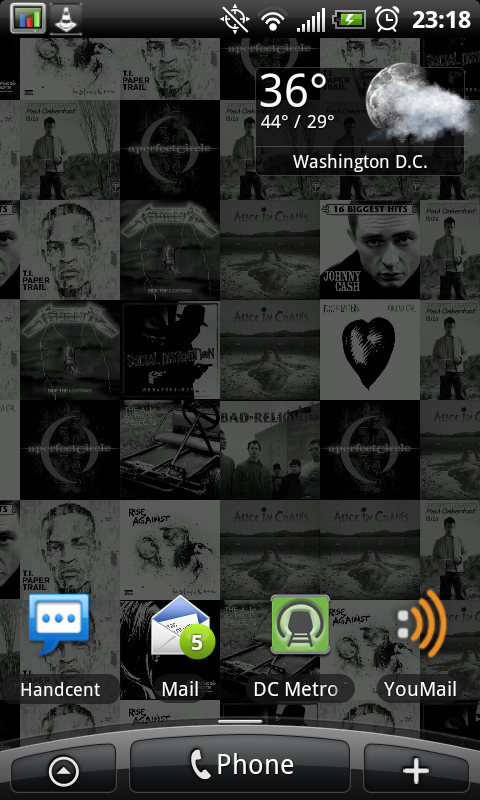
Handcent SMS
The stock SMS/MMS for Android 2.2 is "meh".  Handcent is "aww yeah baby".  New styles, additional themes, customization, font packs, colors - more settings than you shake a stick at.  Hell, it can even make your SMS look like the iPhone with "the bubbles".  Some girl I met at a bar described the messaging that way when she saw it, "Oh that has the iPhone bubbles".  LOL.  Seriously though, it's a killer app and a definite improvement over the stock version.  Free.

Liquor Run Mobile
This little app comes in handy more often than you would think!  It lists all the liquor stores near you (or anywhere in general).  Plus it has cocktail mixing directions and tons of other features.  The mascot is perhaps the coolest part though, it's a bottle of booze running.  Who couldn't love that mascot?  I want a t-shirt with him on it.  Free.  

AppBrain App Market
Although similar to the Android Marketplace, this is definitely superior to Google's stock offering.  There are more ways to sort, search, and filter.  You'll find a lot more cool apps through this market than you will in the stock marketplace - guaranteed.  Install it.  Free.

Winamp
The original badass MP3 player is available on Android.  And yes, IT REALLY WHIPS THE LLAMA'S ASS!  This is probably the best free player out there.  Plus it will sync with your desktop version of Winamp (if you so choose).  All in all a really great player and big improvement on the stock media player.  Free.  

App2SD
Since Android isn't gay, like some of it's competitors...it allows you to install Apps to your microSD card.  This is really nice and ultimately allows you to install tons and tons of apps.  However, it's tough to know which apps support this feature of running on SD (not all do).  Furthermore, you have to do it by hand - individually.  SUCKS.  But this little app solves all that.  It searches your phone apps, finds which ones can be moved to SD, and helps you move them more efficiently.  Free.

GTunes Music
GTunes is kind of like Google, for music.  Search, and download.  It's that easy.  It will let you preview before you download too.  The app also has charts for billboard, specific genres, and countries around the world.  So if you're just looking for some 'Pop', hit up the chart, and start searching.  Downloads MP3's right to the phone.  Somehow I don't think the walled garden is down with that...so jump that wall, sucka!  Free.

PageOnce Travel
I did an earlier article, awhile back, on a head to head comparison of PageOnce Travel and TripIt.  Both apps rock, and both apps make this list.  PageOnce is still slightly ahead because it offers free flight status updates.  In addition to this handy feature it auto-creates your trips from your accounts.  Very nice to have for anyone who travels, even if it isn't that frequent.  Free.

TripIt
TripIt is still a badass app, and it sure as hell ain't no slouch when it comes to travel organization.  Now that it can auto-create trips from confirmations sent to your Gmail account, it's taking big steps forward.  It also handles things like dinner reservations, special events, etc. etc.  I run both PageOnce Travel and TripIt, and you should too.  Don't get caught at the airport or the hotel without your confirmation number.  You're holding up the damn line!  Free.


XBMC Remote
Ok, so first off, if you don't have XBMC...you should.  God knows you have a ton of media on your computer(s).  Music, Pictures, Video, Movies, TV Shows - I know you have it.  Install XBMC, get a media library, and watch your content like a pro.  Impress your friends.  Find a nerdy girl and get her on your couch.  Then, pull out your phone and use it as the remote.  Aw yeah, baby...that's right.  My full review is here.  Free
ADW Launcher
This is the beginings of full customization of your Android phone (minus a custom rom, of course).  ADW, and it's array of themes + customization give you complete control over the look and feel of the phone.  Change the drawer, change the icons, change the status displays, change it all.  There really isn't a limit once you get ADW Launcher going.  Which is very easy.  Download, install, find a theme, and use it.  Then hit your home button.  Done.  Free.  (maybe in the future I'll do a full howto on this...)


So there you go.  10 Great Android Apps - MORE Shit You Totally Need.  Combined with my last list, that's 20 FREE and HIGH QUALITY Apps for Android.  The best part is, I didn't have to sell out to write these lists, nor did I have to study Journalism in college and suckup to some loser in a turtle neck.  New York Times, USA Today, Wall Street Journal - I'm looking at you fools.  Your app lists suck.  Mine do not.  Stoneycase - 2, MSM - 0. 

Monday, December 27, 2010

10 Great Android Apps - Shit You Totally Need

A list of 10 highly recommended and totally FREE Android Apps that you totally need.

Now that Christmas is over, I'm sure you didn't get everything you wanted!  So, why not treat yourself to some cool new Android apps that don't cost a dime?

Below is a list of 10 Great Android Apps, all totally FREE.  This is shit you totally need.
Each app has a link to the AppBrain market so you can download it to your computer, or you can just navigate to the app in the market on your phone.  Screen grabs are included and the descriptions should do a decent job of telling you why that app is SHIT YOU TOTALLY NEED!

VLC Stream & Convert
I've posted on this awesome app quite a few times, so it's obvious I would put it on this list.  Stream HD/SD/MP3 from your computer to your phone.  Over Wifi/3G/4G.  Convert files for playing on your phone.  Use your phone as a remote control for VLC (i.e. control the computer's VLC from your phone).  It's badass.  Free version and paid version.
VLC S&C is the king of streaming

Streaming a 720p MKV file to phone via 3G
Pandora
Have you been hiding under a fucking rock?  Download this app and listen to music.  Enter info to create a channel (like a song name, artist, genre, etc.).  Listen to music on that channel.  It's kind of like being able to create your XM radio channels.  Be careful with their updates though...sometimes shit breaks.  Check the comments before updating this app.  I'm still running an old version, but it seems like their latest fixed a bunch of bugs.  Free application.  Free and paid subscriptions available. 

NextApp System Panel
Best app utility out there for Android.  Check running tasks.  Kill tasks.  View processor, memory, and network useage.  Collect device performance history in easy to read graphs.  View the Top Apps utilizing processor power.  Shows you tasks running that even Froyo won't show you.  Free.


BatStat Battery Widget
Great widge for one of your home screen.  Get percent readout on battery life, temperature, and voltage.  Very accurate.  Very easy to use.  Minimal footprint.  Does not drain battery.  Beware of other impostors they will drain your battery! (kind of ironic when you think about it...) Free.
BatStat is next to the Airplane Widget

Pageonce
Display all of your "accounts" in one easy to read screen.  Financial - like banking, savings, investing, etc.  Bills - like comcast, att, sprint, etc.  Subscriptions - like Netflix, etc.  They just put out a big update for their Android app and changed the look and feel.  Nice upgrade.  You need this.  Free and paid version.  Edit to add:  A lot of people are commenting on this...so some extra info for those interested:  1 - you enter the account info using the website, primarily.  Account numbers are not displayed in the phone, just balances and pertinent particulars (cell minutes remaining, bill due date, recent transactions, outstanding balance, etc.)  2 - you can't access accounts or manipulate accounts from the phone (or the website).  In other words, you can't transfer funds, change passwords, change address, etc. etc.  It only displays info - no controls offered.  3 - you can put a special password for the app itself, which can be diff than your phone password.  you can also allow/deny access to the phone using the pageonce website.  All in all, unless you consider the ability to view your account balances a significant security risk, there really isn't much reason to worry.  
Youmail
Visual voicemail.  Customize answering messages by contact, or by contact groups.  Manage your voicemail via the web.  Very easy to use, very easy to setup.  Free and paid version.

TV.com
Watch TV for free on the phone from CBS.  It's one provider only, but the offering is good, and the quality is good.  Full episodes, live TV and clips.  Free.

ASTRO File Manager
Best file and folder manager out there for Android.  View files/folders over the network.  Has a great image viewer for viewing large picture galleries.  Let's you basically treat the phone SD card and memory like Windows Explorer.  Free.
JamBase
View shows and artists going on in your area.  Add a list of your favorite artists, see when they play next.  Use the locator to see whats going on around you.  Learn about the show, venue, artist and even buy tickets.  Very easy to use.  Free.
ShootMe (Screen Grabber)
Take screenshots of your phone.  Turn on the app and shake the phone.  Presto - screenshot.  Saves the pictures to a folder on your SD card.  Very easy to use.  It's how I make screenshots for this blog.  Free.


So that's it, 10 Great Android Apps to get yourself as a post-christmas gift.  The best part is everything is totally FREE.  Look for another installment of Android Apps - Shit You TOTALLY Need coming in the near future!

Sunday, December 5, 2010

Ten Awesome Android Live Wallpapers - Free for Download

 A selection of 10 awesome Live Wallpapers for your Android phone, all FREE!

Android, unlike the iPhone, has "Live Wallpapers".  Wallpapers that move, play videos, play games, and are interactive.  Below are 10 awesome Android Live Wallpapers that you can download to your phone.  Each live wallpaper is free, and I have provided screenshots for you as well.  Unfortunately I didn't go to the trouble of making .gif's or anything - so the screenshots are static images.  However I try to describe the movement or "live" aspects of each in the description.  A link is provided to the live wallpaper in App Brain so you can download it too. 

Let me know which ones you like and don't like, or if you have any favorites of your own! 

1.  Galactic Core
Very nice live wallpaper of a whirling galaxy that you can tilt and control.  The free version has limited settings, but there is a pay version that gives full control.  Detail and quality of the wallpaper is very good and the live movement is excellent as well.

2.  Pac-Man 
Really cool live wallpaper of the iconic arcade game.  Pac-Man roams the levels avoiding the ghosts and doing what he does best.  The AI is pretty good on this wallpaper, Pac-Man avoids the ghosts, collects points, gets the power-ups and then eats the ghosts.

3.  Substrate
This is a collection of live wallpapers - each with it's own "substrate" flavor.  I highly recommend this live wallpaper for the variety and the customization.  Each live wallpaper comes complete with full settings, even though it's free.  Shown here are Sandollar, Guts, and Sand Traveler.  The live wallpapers are drawn on the screen, detailed, and then repeated.


4.  Flying Toasters
From waaayy back when, the flying toaster returns!  Toasters and toast fly across your screen.  Need I say more?  Nostalgia!

5.  Flurry
The Mac OSX style "Flurry".  For anyone who's ever owned a mac, used a mac, or knows what I'm talking about...this is a live wallpaper version of the Flurry screensaver.  Pretty much a perfect copy of it too.

6.  Galaxy Live
This is another collection of live wallpapers - each a different type of galaxy or nebula.  Although not exactly true to the real stellar phenomenon, each live wallpaper is quite a sight.  There are more than a half dozen to choose from, each various colors and detail.  Movement is pretty much the same amongst them all, but the colors and details provide a nice variety. 


7.  3D Matrix Code
There a lot of Matrix code live wallpapers, and they all pretty much do the same thing - stream Matrix code on your screen.  This one has a slightly different twist by adding a 3D effect.  There is some depth, or distance, to the code that changes its size.  The developer also added some flames, which are actually a nice touch. 

8.  Living Music (Album Art)
This live wallpaper takes your album art and creates a live wallpaper with it.  Album art is randomized and interchanged creating a nice look and feel.  The album art is not colored though, but the overall grey color keeps the screen from feeling cluttered.  There are other version of this same type of live wallpaper, though most of them are paid versions. 

9.  Liquid Particles
A cool live wallpaper that puts colored light particles on your screen that you can interact with.  As you tap the screen the particles fly about until finally coming to rest.  Tap the screen again and they continue to fly.  Do nothing for awhile and they start flying on their own. 

10.  Metal Slug Zombies

Some live wallpapers also double as games.  This one is a take on a fantastic old game - metal slug.  Zombies walk across the screen and you bomb them.  Tap the screen to drop the bomb.  A plane flies in, drops the bomb, and the zombies explode.  There are lots of settings that allow for customization of the background, the zombies, bombs, and other features.  It also keeps track of your score.

There we have it, a top 10 list of free Live Wallpapers for your Android device.  Let me know if you have any suggestions to add to the list! 

Thursday, November 4, 2010

VLC Stream & Convert + VPN = Stream HD Over 3G/4G with Android (Part 3)

Following up on this topic, I have some "Tips & Tricks" for users seeking to stream HD/SD to their Android phone over 3G/4G.

Couple things up front:
  1. A New version of VLC S&C has been released by the developer.  I suggest you download it!  You may notice that VPN is now a prominent part of his app!  :D  :D 
  2. Along with the updated app version, the developer has posted a VPN setup guide here.  I suggest you take a look at it.  You may notice some similarities!  This is a good thing!  As I mentioned before in my earlier posts, I believe streaming over VPN to be the best solution for 3G/4G connections.  
Now for the tips & tricks:
  •  For security purposes, make sure you give your VPN username and password some serious consideration.  "vpnuser" is fine, or whatever (vpnass, vpnyourmom, these are also good!)...but for the love of god, give it a decent password.  Remember what you're doing here people.  
  • Enable the Wifi radio, but do not connect to a Wifi network when streaming over 3G/4G.  I have had problems streaming when Wifi radio is not on.  I am unsure as to why this is, but I have also read of other users having the same issue.  
  • When possible, try to avoid switching from 3G to 4G.  I know I know, but if you suddenly decide to turn on 4G in the middle of watching a movie, at say, the National Mall, be prepared for a wait, and possibly the need to reconnect to both the VPN and the remote VLC server.
  • Moving around is just fine, as is roaming from cell tower to cell tower, however you may notice some buffering.  This is fine, just be patient...
  • Enable encryption in the Android VPN settings, as well as checking the box in Windows VPN setup to "require all users to secure their passwords".  See the VPN setup info for more on this subject.
  • Use H264 for your streaming, and experiment with the bitrate/quality settings.  You may find that reducing the quality setting will improve streaming.  The developer has a comment on quality settings as well in their VPN setup page
  • Check which version of VLC you are running on the computer.  I recommend running VLC 1.1.3, or VLC 1.1.2
  • Last, but certainly not least, consider buying the VLC S&C Pro version, or donating.  Support the developer if you like what's going on.  Of course you can fully utilize the features of the free version to get the job done, but thats not the point - give credit where credit is due.  Its not that much money anyway.  Besides, the guy has airplane tickets to buy, I'm sure ;)  
That's all for now.  Please look for me to be providing a full and thorough review of the latest version of VLC Stream & Convert app in the near future.  Also look for me to be returning to subjects of Giganews, Usenet, VyprVPN, and others in the coming weeks.  VPN and security should be at the forefront of your minds, considering the recent release of script kiddie tool "Firesheep".  (p.s. I"ll be hitting that in this blog later as well)


47KRYQWK3Q5P

Friday, October 29, 2010

VLC Stream & Convert + VPN = Stream HD Over 3G/4G with Android (Part 2)

Alright, as promised, here are some screenshots to help with the setup so you can stream HD over 3G/4G to your Android phone.

First, recall my previous post on the subject and the tools required to get the job done
  • Phone with Android (I suppose this could work on iPhone/iPad as well)
  • Computer for VPN Server (allows phone to VPN connect to your LAN)
  • Computer for VLC media player (free software, must activate web interface)
  • VLC Stream & Convert app from Android Marketplace (free)
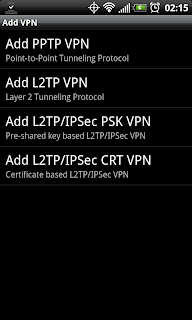
Setting up VPN on the phone is relatively easy.  Here you see some of the VPN choices Android 2.2 offers.  PPTP is by far the easiest and most popular type of VPN.
Types of VPN available on Android for setup

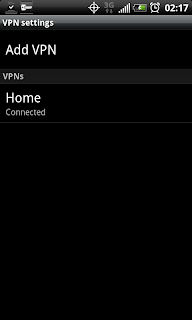
Once you setup the VPN, which for PPTP is as easy as providing the server address (IP address) and credentials (user/pass), you will have a VPN network that you can connect to.  Screenshot below shows a "Home" VPN after it has been added to the phone.
"Home" VPN Network, click to connect
When you click the network to connect to the VPN you will need to supply the user/pass.  This user/pass is the one you setup on the computer with the incoming VPN connection.  Once connected it will tell you so, and place an active key icon in the phone status bar.

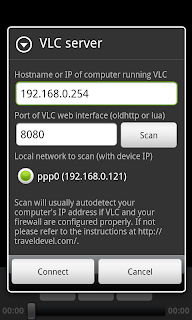
Once the phone is connected to the VPN, go ahead and open VLC S&C on the phone.  Make sure you supply the correct server address for your computer with VLC media player running.  Also make sure that VLC has the "web interface" active (view > add interface > web interface).

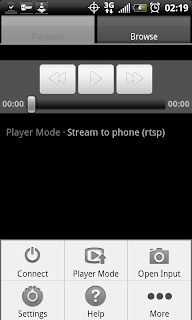
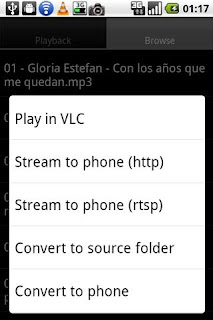
Here is the home screen in VLC S&C with the menu open.  You need to supply the computer information under the connect menu.
VLC Stream & Convert Menu
VLC Stream & Convert Connect Menu

Once finished go ahead and click connect.  If it all is going well you will get a connect prompt, and the VLC logo in the phone status bar will be active.  When VLC S&C is disconnected that icon will have a red X through it.  Plus you will get an error, "can not connect to bla bla bla."

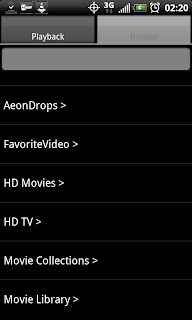
Put your player mode on "Stream to Phone RTSP".  Open the Browse tab and select your movie/tv/video files you wish to play (.mkv play very, very well).
Browse tab displaying folder tree
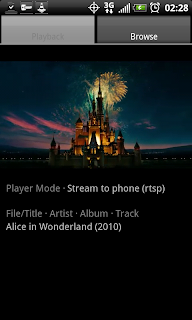
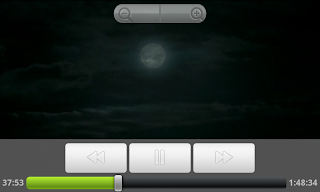
Now, for some example screenshots of the quality you can expect to come through on 3G:

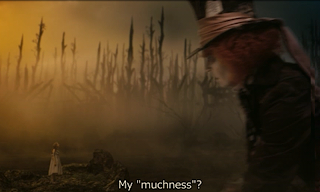
Streaming Alice & Wonderland over 3G in portrait mode
Streaming Alice & Wonderland over 3G in landscape, showing controls
Streaming Alice & Wonderland over 3G in landscape, showing subtitles
Streaming Avatar over 3G in landscape
 Couple of notes on the example screenshots:
  • These files being played by VLC are .mkv rips of HD sources, these are 720p rips (technically VLC S&C will play anything VLC will play, so have at it, I used these for illustrative purposes). If you'd like to show screenshots of other types of files say so in the comments and I'll post them.  I have SD, 1080p, other 720p, HDTV rips, etc etc. 
  • It is hard to take screenshots of live video - so if you see a line, as you can sort of see in the last one, that is because of the movement in the video, not the quality of the playback.  I tried to use pause, and then screenshot, but pause reduces the video to half size in the app and negates the purpose of trying to take a screenshot...
  • VLC S&C is free, but there is also a paid version.  The free version is limited in some functionality, but also has some quality limitations for the H.263 and H.264 codecs.  I am using the free version with the H.264 and the bitrate on 768.  Aspect ratio is on 16:9.  For playback, landscape video width is set at 880 (for the EVO4G).  For playback, portrait video width is set at 480.  I find these settings to work extremely well on most .mkv for the EVO4G.  I hope that comes through on the screenshots.  
  • Playback is free of stutter and audio is in-sync, clear and crisp

So there you have it...streaming HD (or SD) video over 3G/4G to an Android phone.  Using nothing but freeware and windows.  The solution is simple, first establish the VPN connection, then fire up VLC Stream & Convert on the phone.  Navigate to your files, play, and enjoy HD video on your phone while on the go.

Questions/Comments/Rants/Raves, put them in the comment section.  Hopefully this post has been useful for somebody! 


.

Thursday, October 28, 2010

VLC Stream & Convert + VPN = Stream HD Over 3G/4G with Android (Part 1)

Laides and Germs,

You'll have to excuse me for not updating in the recent past - been very busy.  Working two jobs.  One for NASA, and another, well for someone else.  Plus there's another job in music.  Then there's all that glorious free time, which is mainly used for laundry, bills, drinking, and sleeping.  Occasionally eating too.  I am a skinny bastard though...

OK, I'll get right to the point - I am a huge fan of VLC Stream & Convert app for Android.  It's fucking smoking.

Ex Screenshot of VLC S&C Showing Major Functions
This post is all about using that app to stream HD video to your phone over 3G/4G.

Technically, VLC S&C does this "out of the box".  However, you'll find forums, posts, and comments all over talking about problems and issues with RTSP (real time streaming protocol) and just problems in general.  You will also run into issues with your carrier - note the setup instructions in that link, for each carrier it can be different, or blocked completely...Hell, even I couldn't get the bitch to work properly over 3G/4G (Sprint).  I could connect to the computer running VLC via 3G/4G, but I couldn't play shit.  Of course, this doesn't make the app useless, you can totally connect via your local wifi and go about your business.  See my earlier post on that bad ass business.

But, if you want 3G/4G HD streaming, I believe I have found the best way to do it - with VPN.  It is working for me.  In fact, while I'm writing this, I'm streaming Star Wars IV, A New Hope, in 720p (.mkv file) to the EVO4G over 3G with NO STUTTER.  Audio is crisp, video is perfect quality.  Like I was watching it on my plasma tv.

The solution is so simple, I love it:  You first connect the phone to the VPN server on your network, then fire up VLC S&C.  Then connect VLC S&C as usual, and viola you are finished.

I'll try to clean this post up a bit in the next few days with more instructions and hopefully some screenshots.  For now, this rough bullet list will have to suffice:
  • Android (and iPhone for that matter) can connect to VPNs
  • Setup VPN on your local home network (ex, vista setup instructions)
  • Connect the phone to the VPN (not too hard, just supply the server address and credentials)
  • On a computer on your network, open VLC and run the web interface (see VLC S&C setup)
  • On the phone open VLC S&C and connect to that computer running VLC (phone should already be connected to VPN, and therefore using a local address!)
  • Browse to your HD files and start streaming to the phone via RTSP as usual, enjoy your HD (720/1080), SD, Audio, whatever on your phone wherever you go!
There you have it.  Streaming HD to your Android with all freeware and minimal effort.  Well, minimal effort for you all, it took me a bit to sort through it all and get it working...

Don't forget, if you're behind a router/firewall to get your port forwarding on.  For both VLC and the VPN, holes will need to be punched in the firewall.  Totally standard and not difficult, but it is required. 

If you have questions or problems go ahead and leave a comment.  I'll do what I can.  If any of you decide to get this going yourself, please post and tell us about your success!  I'd love to think that others can get it working too (I'm already working on showing this to my close friends and coworkers)

Thursday, September 23, 2010

VLC Stream & Convert - Stream Video to Phone

There is a free app out for Android in the Marketplace called VLC Stream & Convert.  It does exactly what it says, and then some:
  • Stream video files from computer to phone using VLC
  • Control VLC using Phone as Remote Control
  • Convert video files on the computer to phone formats
VLC Stream & Convert Player Modes

    So yeah, the app is pretty badass really.  You can use it like a TV remote on VLC, browsing for video files and playing them.  Plus you can stream video from the computer to the phone.  Anything VLC can play, you can basically stream.  If you need to convert the video, you can do that too.

    VLC rocks out with the cock out
    Setup is easy and the developer actually has the info in the app, and on the website.  You may end up needing access your router for ports, but it depends.   Check out the setup page for more info.

    This is the homepage of the app, run by the developer, who is apparently on travel 24/7 (lucky bastard!)
    Stream video to phone
    I've tested this fairly extensively and have had little to no problems to report.  Using the phone as a remote control is fast and responsive.  Streaming 720p or other high def to the phone is also hassle-free.  You all can let me know if you have any problems in the comments.  I'll try to help you debug, if it comes to that...Either way get on it and start enjoying the freedom of .MKV from your massive library right to your mo-fuckin' phone, yo!